Pedro Olivares
VPC or On-Premises? Control Without the Datacenter

Somewhere in every enterprise AI project there is a meeting where someone from security asks a short question: “Does this run on-premises?” It sounds like a question about servers. It almost never is.
Behind it sit five much more specific worries. Where does our data live? Who holds the keys? What leaves the building? Who can see what? And what happens when the vendor has a bad day? On-premises became the default answer to all five because, for twenty years, it was the only setup where you could be sure of every one of them. Checklists got written around it. “On-prem” turned into the safe thing to ask for, whether or not it was the thing that answered the questions.
We deploy Timbal four different ways, on-premises included, and we are happy to do any of them. We still have a view on when each one is worth it, and on a cost that rarely makes it into the business case. The short version: for most of what we build, you can keep every bit of the control you wanted from on-prem and skip the datacenter. For some systems you cannot, and we will say which.
The five questions behind “on-prem”
Ask a security team what they actually need and the list looks much the same everywhere:
Residency. The data stays in a place we can name, in a country we can name.
Keys. We hold the encryption keys, so nothing can be read without us.
Perimeter. Nothing talks to the outside world unless we said it could.
Visibility. We can see who touched what, and the record is ours.
Exit. If the vendor has a bad day, our data and our systems are still ours.
Notice that none of the five says “in our own building”. They all describe control. Building and control got fused because owning the hardware was the only way to get the control. That stopped being true when clouds learned to give you a private network, your own keys and a log of every call.
A VPC, in plain words
A VPC, a virtual private cloud, is a private network that belongs to you, inside a cloud provider’s datacenter. Your address ranges, your firewall rules, your encryption keys, your account. Nobody else’s workloads share it. From a control point of view it is a datacenter you rent by the minute: you decide what is reachable, from where and by whom, and you can see every API call that touches it.
Whether a VPC gives you the control is the easy half of the question. The half that decides how an AI platform behaves once it is there is how the platform itself is split.
Two planes, and why they matter
Timbal is built in two halves. The control plane is what Timbal operates. It is where developers build and manage applications, where orchestration happens and where updates come from. The data plane is where the work runs: workflows, agents, APIs and the knowledge base. Everything that touches a document, a customer record, a prompt or an answer lives in the data plane. The control plane holds none of it.

So “where does Timbal run?” has two answers. The control plane runs in Timbal’s cloud. The data plane runs wherever you decide, and in every setup it is the same software working the same way. That one design decision is what the rest of this post hangs on.
Four ways to run it
What changes between the four options is not the product. It is who owns the infrastructure underneath the data plane.
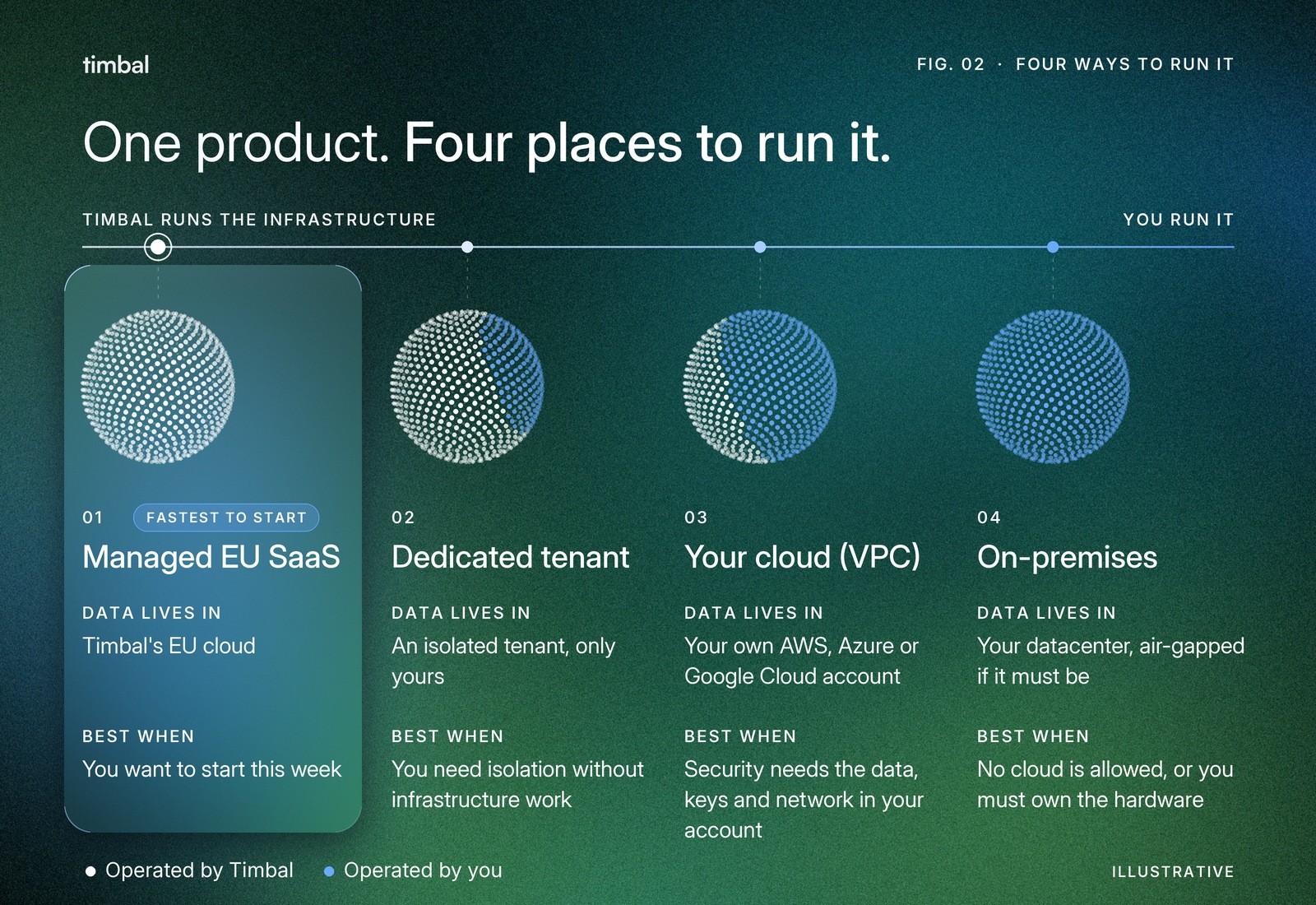
Managed EU SaaS. The fastest start. The data plane lives in Timbal’s EU cloud, hosted in Stockholm and operated by us. A good fit for pilots, and for use cases where the data can sit with a processor under a data processing agreement.
Dedicated tenant. The same arrangement in an isolated tenant that only your workloads use. You get isolation without any infrastructure work on your side.
Your cloud. The data plane runs in your own AWS, Azure or Google Cloud account, in a VPC you own. Your account, your network, your keys. This is the setup most security teams are comfortable with once they see how it is wired, and the one the rest of this post is mostly about.
On-premises. The same data plane in your datacenter, including fully air-gapped and strict-residency installations.
1
data plane, the same software and the same operating model in all four setups
What actually crosses the line
When people hear “the control plane is in the vendor’s cloud”, they picture their data travelling there. It does not. The two planes talk over a mutually authenticated link: each side proves who it is with certificates issued for that specific environment and rotated automatically. Only orchestration traffic goes across it, meaning the instructions about what to run, the platform’s own API calls and the updates. Customer data does not.
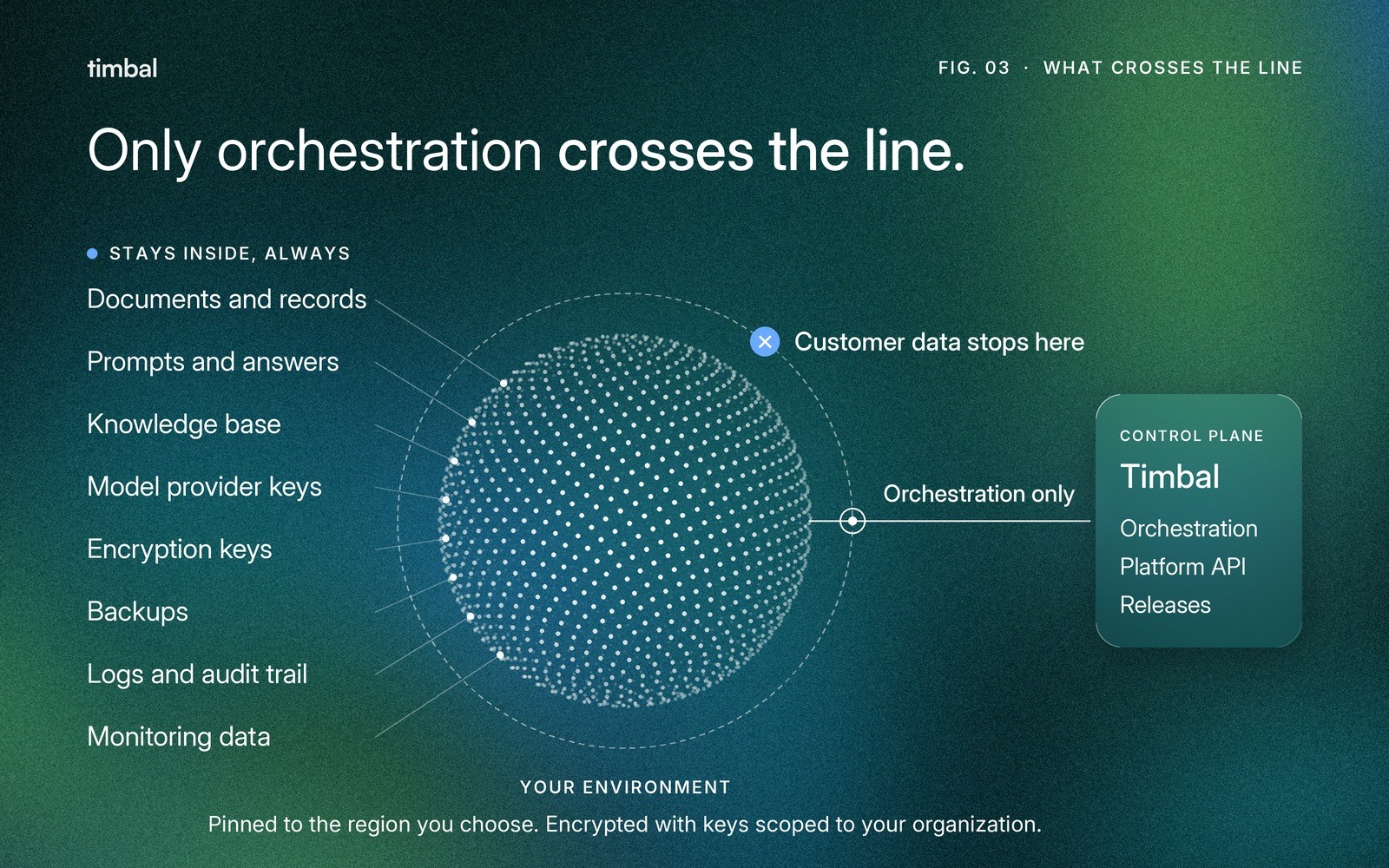
Inside the environment, the things a security review goes looking for are where you would want them:
Data and the knowledge base. They run entirely inside your environment and answer queries without depending on anything in Timbal’s cloud. Backups are written to object storage in your account.
Keys. Data at rest is encrypted under keys scoped to your organization, held in your cloud’s own key service.
Network. Compute has no public IP address. Calls to your cloud’s own services stay on the provider’s private backbone, and inbound traffic passes a firewall that filters common web exploits.
Region. The deployment is pinned to the region you choose. Multi-region is supported when some data has to live somewhere else.
Logs and audit. Monitoring runs inside your environment unless you ask Timbal to host it. Either way you can see what happened without exposing the data underneath.
The app your people use. It can be served through Timbal’s CDN, which stores no data, or from inside your environment when you need full isolation.
Models deserve their own line, because they are where “nothing leaves” gets tested. The path to a model is chosen per deployment: models served in your cloud region, such as Amazon Bedrock, your own provider keys for OpenAI or Anthropic, or models Timbal deploys inside your environment for cases that need self-hosted inference. The keys are yours in every case, and Timbal does not train on your data.
Who owns what
Put three of the setups side by side and look at where the word “you” shows up.

Read down the middle column. Data, keys, network rules and model access, the four rows a security team cares about most, are yours in a VPC, exactly as they are on-premises. What on-premises adds on top is the last two rows: capacity you size and hardware you own. In a VPC that capacity is your cloud account, and it stretches when the work does.
What on-premises really costs
Owning the hardware is not wrong. It is a cost, and a cost should buy something. Four things tend to be missing from the spreadsheet:
Lead time. Servers and GPUs arrive on a procurement timeline, not an API call. A use case that proves itself in March can wait until autumn for the capacity to run at scale.
Capacity is a forecast. AI workloads are spiky: a month-end close, a campaign, an agent that works so well three departments start using it. Buy for the peak and most of it idles. Buy for the average and the peak is slow. In Timbal’s data plane, workflows, agents and APIs scale independently, so a spike in one does not starve the others, but on fixed hardware there is a ceiling underneath.
Models. The hidden one. If nothing may leave your network, models have to run inside it. That means GPUs and models you can host yourself, and many of the strongest models are offered only as hosted services. In a VPC you can reach models in your own region from inside your private network. The constraint we plan around is that model availability varies by region, so region and model are chosen together.
Everything around the software. Platform updates are coordinated from the control plane in every setup. What on-premises adds is the hardware lifecycle, the cluster underneath and the disaster recovery site, all of which become your team’s job.
The cost nobody puts in the business case
Here is the part that surprised us. The price of a deployment model is not set by the first project. It is set by the fifth.
Before any agent runs, every AI project needs the same things: a security review, a network path, keys, identity and somewhere to run. If each project negotiates them separately, that work is paid again every time, and it is usually the slowest part. The delay is rarely the model. It is the queue for the environment, which is one of the reasons most pilots never reach production.
Install the data plane once and the arithmetic changes. The first project pays for the environment: review, network, keys, identity. From the second one on, those are done. The only new work is the project itself.
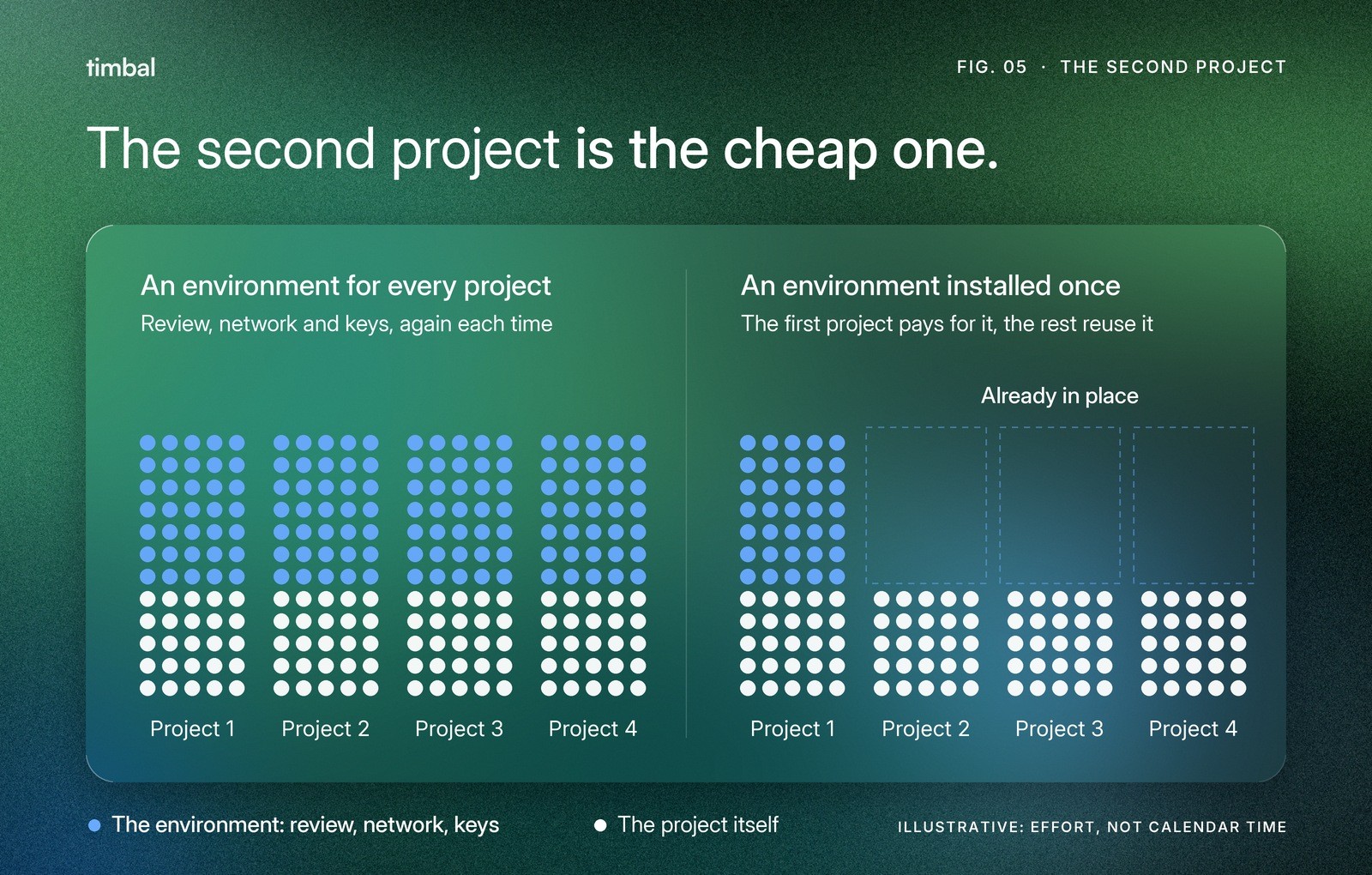
How big is the environment part? On AWS, Timbal is delivered through AWS Marketplace as a template your own account launches. You point it at a VPC, a region and some subnets, set a handful of parameters, and the whole data plane is provisioned, including the private link back to the control plane. For an AWS data plane that is typically a matter of engineering hours, not weeks. For Azure, Google Cloud and on-premises, the same result comes from infrastructure-as-code modules.
Hours
to stand up a data plane on AWS, typically, rather than weeks
That is the compounding part. Each new use case reuses the connectors, the knowledge base, the approvals and the access rules the previous one set up, and it lands inside a perimeter your security team has already reviewed. It is how a first solution can be in production in about four weeks, and how the tenth does not start from zero. If you want to see what reuse looks like in the data layer, the ontology post walks through it.
What you do not give up
Timbal is ISO 27001 certified, SOC 2 Type II is in progress, and the platform is aligned with GDPR and the EU AI Act. The evidence is public at the trust center. Those certifications cover how we build, operate and update the platform, and they apply to every setup because it is the same platform.
In a VPC the cloud account is yours, so responsibility is split the way you already know from any cloud workload: we answer for the platform, you answer for the account. Inside the data plane, access control sits on the data itself, with roles, row and column rules, masking and an audit trail, rather than in a prompt that asks a model to behave.
When on-premises is the right call
We deploy on-premises, and for some systems it is the only honest answer. These are the cases we see:
No connection allowed. Air-gapped networks in defense, parts of critical infrastructure, some classified work. If the system cannot see the internet at all, the data plane has to live inside the wire.
A rule that names the hardware. A law, regulator or contract that requires machines you own, or a location where no suitable cloud region exists.
Hard latency or a factory floor. The system has to sit next to machines and answer in milliseconds, or run at a site with unreliable connectivity. These are often hybrid: on-premises for the loop that cannot wait, the cloud for the rest.
GPUs you already own. A large, underused GPU estate and a requirement to host models yourself. Using what you have is a good reason.
For strict-residency and air-gapped installations, the container registry and the application UI can both sit inside your environment, so that nothing has to leave it.
What is not on that list is “it is how we have always done it”. That is a fair thing to feel and a poor thing to build a budget on. If the requirement behind the habit is one of the five questions at the top, a VPC answers it. If it is one of these four, on-premises is not a compromise. It is the right architecture, and the data plane works the same way there.
How to choose
Four questions, in order. Stop at the first yes.

If you get to the end without a yes, you probably do not need a perimeter of your own, and the managed EU setup will get you moving fastest. If the fourth question is a yes, which it is for most regulated companies, a VPC gives you the control you were asking for without the datacenter.
Questions we get
Does our data leave our account in a VPC deployment?
No. Customer data lives in the data plane, in your account. The control plane orchestrates and stores none of it. Only orchestration traffic crosses the link between the two, over a mutually authenticated connection.
Is it the same software in every setup?
Yes. The data plane is the same in all four. What changes is who owns the infrastructure underneath it.
Can we avoid sending data to an outside model provider?
Yes. The path to models is chosen per deployment: models in your cloud region, your own provider keys, or models Timbal deploys inside your environment for self-hosted inference. Model availability varies by region, so we pick region and model together.
Can we change our mind later?
What you build is code in git, deployed per environment, so projects do not depend on where they run. Moving the data itself is a project, not a button, so it is worth choosing with the data’s requirements in mind.
Does Timbal train on our data?
No. Timbal never trains on customer data.
If your security team is asking for on-premises, the most useful first step is to find out which of the five questions sits behind it. Bring the answers and we will tell you honestly which setup fits. See how we work inside your perimeter, or talk to us.


